
Generating C Code#
Sinelabore creates compact and clearly readable C code from hierarchical UML state charts. There are a number of different ways in which the generated code can be fine-tuned through the setting of configuration parameters. This allows generation to follow known patterns, which are illustrated with examples below.
-
Object pattern: Instance related data is always grouped in a struct. All state machine related functions operate on this data struct. The advantage is that the data flow is easy to follow, the code is re-entrant because there is no global manipulated state, and multiple instances are easy to realise.
-
Opaque object pattern: This is similar to the object pattern, but hides the implementation from the outside of the generating state machine code. This further reduces dependencies between the state machine implementation and other code. See also https://en.wikipedia.org/wiki/Opaque_pointer
-
Single instance pattern: Typically there is only one instance and no instance pointer is needed. For example, implementing an IRQ handler as a state machine, or using a hardware module in the state machine that exists only once.
Used C-Language Constructs#
In the generated code, state hierarchies are mapped to nested switch/case code. Event handling code is mapped to if/else-if/else structures. The various configuration parameters allow you to generate code that is optimal for your system. See the PDF manual for a list of all available options. To generate C code call the code generator with the command line flag -l cx. To generate a configuration file with all parameters related to the C code generation call the code generator as follows once:
java -cp path_to_bin_folder/* codegen.Main -l cx -gencfg > codegen.cfgThere are various configuration options to adjust the generated code usage e.g.
- As interrupt handler without any parameterss:
#pragma vector=UART0TX_VECTOR
__interrupt void irq_handler(void) {
    /* generated state machine call */
    testcase(EVENT_TIMEOUT);
}- Having only the event as parameter of the handler
- Having an instance pointer and event as parameter (for running multiple instances of the same machine e.g.
void testcase(TESTCASE_INSTANCEDATA_T *instanceVar, TESTCASE_EVENT_T msg ))- Having an own defined parameter containing the event which allow to easily send data with the event
void testcase(TESTCASE_INSTANCEDATA_T *instanceVar, USER_EVENT_T *userData)-
Events that carry fields. The handler then takes
const TESTCASE_MSG_T *userData. See below. -
Support for externally defined events (i.e. outside the UML diagram) to better support reuse of legacy code
-
Support for conditional events (i.e. boolean expressions)
-
The C backend has features for high-availability applications where it is desirable to detect serious errors happening outside the state machine code but effecting the correct execution of the state machine. Such errors might come from a runaway pointer overwriting key variables, power brownout corrupting a bit or a bad ram cell losing a bit to name a few. To detect and handle such situations is an overall system design task. But the code generator can help you to detect inconsistencies of the state machine offering different mechanisms described in the manual.
-
The code generator supports code generation from models with regions. A region is an orthogonal part of a state. Regions allow to express parallelism within a state. A state can have two or more regions. Region contains states and transitions.
Events that carry data#
An event can carry named fields. The fields belong to the event name, so every transition on that name uses the same fields. The type is C type text, such as uint8_t or char*, and is copied into the generated struct as written. The model’s header includes whatever that type needs. An event with no fields stays an enumerator.
In the built-in editor the Event Overview shows the fields after the event name. Edit payload… opens the table of names and types. The transition dialog shows that payload under the event text, and Edit… opens the same table. A conditional event, marked with the checkbox or a leading #, carries no fields.
The diagram file stores the fields. A field name is an identifier, unique for that event. Avoid C keywords and the names the generated code uses itself: msg, data, userData, evConsumed and the instance parameter. Generation does not check them; the compiler reports a clash. HsmFunctionWithEventParameter must be yes. With that key left at no, a model that declares fields stops generation and writes no output file.
With fields present, the event argument is a pointer to one message struct. HsmFunctionUserDefinedEventParameter names the type. An empty value means TESTCASE_MSG_T. The generator writes the typedef in the _ext.h file. The event id is the member msg. Each event that has fields is one member of the union, so the fields of that event are live together. PrefixMsgWithMachineName=yes names the id member testcaseMsg.
typedef struct {
    uint8_t no;
    float val;
} TESTCASE_EV3_T;

typedef struct {
    TESTCASE_EVENT_T msg;
    union {
        TESTCASE_EV3_T ev3;
    } data;
} TESTCASE_MSG_T;

void testcase(TESTCASE_INSTANCEDATA_T *instanceVar, const TESTCASE_MSG_T *userData);
The caller keeps the message and passes its address. The handler only reads it.
TESTCASE_MSG_T msg;
msg.msg = ev3;
msg.data.ev3.no = 9;
msg.data.ev3.val = 2.5f;
testcase(instanceVar, &msg);
The comparison uses the id. Inside that branch the generator binds every field, and a guard or action uses the name:
if (userData->msg == (TESTCASE_EVENT_T)ev3) {
    uint8_t const no = userData->data.ev3.no;
    float const val = userData->data.ev3.val;
    if (no == 4) {
        /* ... */
    }
}
The const follows the type, so only the local is read-only: a char* field stays a pointer to writable characters, and a type that starts with const gets no second one.
A choice reached from the transition is inside the branch, so its guard sees the same names. Entry, exit and do code also run on paths that have no message, so a value they need is stored from the transition action. A region handler receives the same const TESTCASE_MSG_T *userData. A machine that declares no fields is unchanged, and a hand-written USER_EVENT_T stays hand-written.
Showing the state on a PC#
The code generator can show where a machine running on your target is. Started with -V, it draws the state diagram and highlights the states the target reports. A report is a short text:
from=oven;state=Cookingfrom is the name of the machine, as the viewer knows it: its model file name, or the name given with -SIN. state is the innermost active state. The generated code provides both parts: ovenGetInnermostActiveState() in oven.h returns the state, and ovenGetNameByState() in oven_dbg.h its name.
#include <stdio.h>
#include "oven_ext.h"
#include "oven.h"
#include "oven_dbg.h"  /* defines the name tables: include it in one C file only */

/* Your transport to the PC: UDP, UART, CAN, ... */
void send(const char *text);

/* Report the innermost active state. Call it after each call of the state machine. */
void ovenReportState(const OVEN_INSTANCEDATA_T *instanceVar)
{
    char report[64];
    OVEN_STATES_T state = ovenGetInnermostActiveState(instanceVar);

    if (state == __OVEN_LAST_STATE__) {
        /* no known state, e.g. an instance not initialised: nothing to highlight */
        snprintf(report, sizeof(report), "from=oven;state=");
    } else {
        snprintf(report, sizeof(report), "from=oven;state=%s", ovenGetNameByState(state));
    }
    send(report);
}oven(&ovenInstance, msg);
ovenReportState(&ovenInstance);With the single instance pattern, ovenGetInnermostActiveState() takes no argument. A machine with regions reports one name per active region, separated by commas: from=oven;state=Cooking,LampOn.
Each report is complete, so the viewer is right again after the next one. Send a report after every state change, and best also periodically, so a lost message or a restart of the PC does not leave a wrong picture.
On the PC, the viewer receives the reports over UDP. A target with a network interface sends them there directly; otherwise a small program on the PC receives them over the serial or CAN link and forwards each report as one UDP datagram. The settings in codegen.cfg and the start of the viewer are described with the integrated editor:
java -jar codegen.jar -V -p ssc -o oven oven.xmlShowcasing the Generation of C-Code from a hierarchical State Chart#
This example was created with EA and is available on Github (examples/LinuxMacBSD/microwave_ea_hierachical_c). On top level a class diagram is required with a class that owns a state machine diagram.
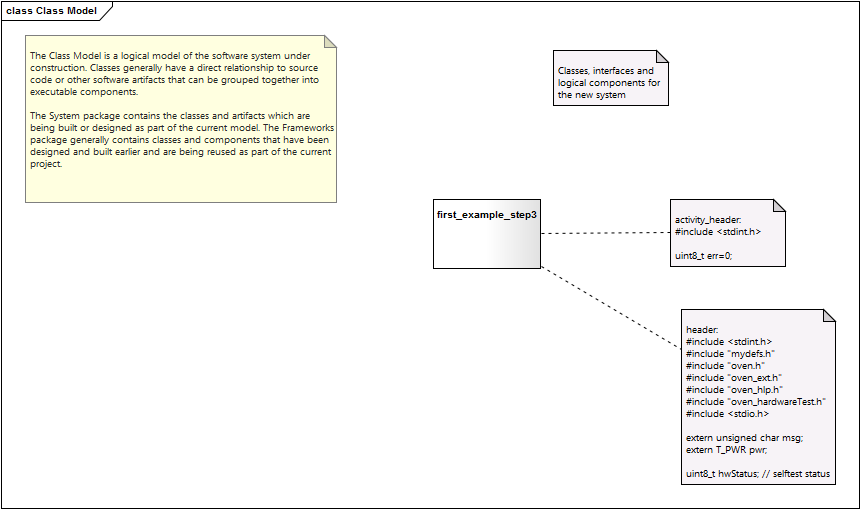 . The diagram showcases also how additional include files and local variables can be defined that are added to the generated code.
An example state diagram modeling a hierarchical microwave oven is shown below. Imagine the effort to manually write the code for this machine. And even worse how difficult it would be to maintain it over time when new states/events are added.
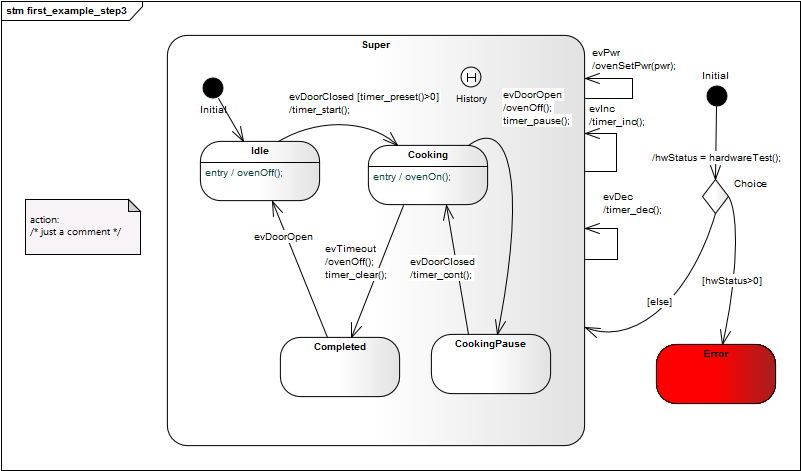
At startup of the machine it is decided whether the error state is entered or not using a choice pseudostate that takes its decision based on a self test function. This function was modeled as activity. Also this code can be fully generated by the code generator.
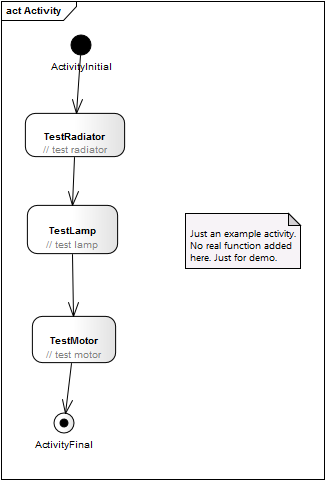
How to generate the code for the state – and the activity diagram is to run the following commands:
Generated Files#
This results in the following files:
- C-file with the state machine implementation
- H-file of the state machine
- H-file with the events that can be sent to the machine
- Main and hlp files with some code that supports debugging i.e. sending events to the machine and realizing the timeout events.
Example code generated from the oven example in the handbook: